Visual content sits at the center of almost every digital experience today. Blog posts, online stores, social media feeds, and presentations all depend on images that look polished and feel relevant. Until recently, producing that quality required specialized software, trained designers, and a fair amount of time. Artificial intelligence is now changing that equation. Instead of mastering layers, masks, and brushes, people can describe the change they want in plain language and watch the result appear. This article explains how modern AI image editing works, where it is most useful, and how to use it responsibly.
What Is Modern AI Image Editing?
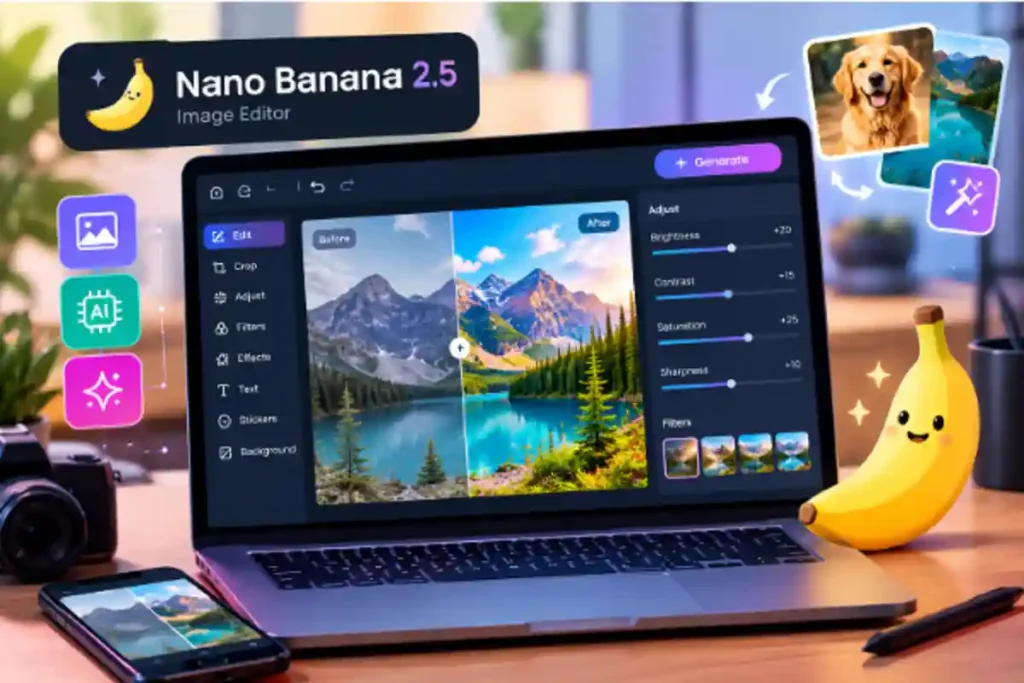
Traditional photo editing is manual. You select an area, adjust it, and repeat the process until the image looks right. AI image editing shifts much of that effort to a model that understands both the picture and your written instructions. A tool like the Nano Banana 2.5 image editor reflects this shift, allowing users to upload a photo, describe an edit in everyday words, and receive an updated version without touching complicated controls. The model interprets what is in the scene, such as people, objects, lighting, and background, and applies changes that respect those elements.
This approach matters because it lowers the barrier to entry. A small business owner who needs a cleaner product photo no longer has to hire a retoucher for a simple background change. A teacher preparing classroom materials can adjust an illustration in minutes. The technology does not replace creative judgment, but it removes a great deal of technical friction.
How Conversational Editing Works
At the core of these tools are generative models trained on very large collections of images paired with descriptions. During training, the model learns relationships between words and visual features. When you type an instruction such as “make the sky look like sunset” or “remove the person in the background,” the model uses that knowledge to predict what the edited image should look like.
What makes the newer generation of editors stand out is consistency. Earlier systems often changed too much, altering faces, shifting colors, or distorting objects you wanted to keep. Improved models are better at preserving the parts of an image you did not ask to change. This allows for a step by step workflow, where you make one edit, review it, and then refine it with a follow up instruction. The process feels more like a conversation than a technical task.
Several common edit types are now widely supported:
- Background replacement or removal
- Object removal or addition
- Style changes, such as turning a photo into a watercolor or sketch
- Lighting and color adjustments
- Combining elements from multiple images into one scene
Practical Uses for Creators and Businesses
The value of AI image editing becomes clear when you look at everyday use cases.
Ecommerce and product photography. Online sellers often need consistent images across a catalog. AI editing can place products on clean backgrounds, adjust shadows, or show the same item in different settings, which saves the cost of repeated photo shoots.
Marketing and social media. Content teams work under constant time pressure. Being able to adapt a single image into several variations, each tailored to a different platform or campaign, helps maintain a steady publishing schedule without sacrificing visual quality.
Education and publishing. Writers, teachers, and publishers can modify diagrams, illustrations, and cover concepts quickly. This is especially helpful when a project has a small budget but still needs professional looking visuals.
Personal projects. Families restoring old photographs, hobbyists experimenting with digital art, and travelers cleaning up vacation pictures all benefit from accessible tools that do not require training.
Tips for Getting Better Results
Like any tool, AI image editors reward good habits. A few practical suggestions can noticeably improve your results.
First, be specific. A vague instruction leaves the model to guess, while a clear description of the subject, the desired change, and the intended mood gives it stronger direction. Instead of “make it better,” try “brighten the image slightly and soften the shadows on the left side.”
Second, edit in small steps. Making one change at a time is easier to evaluate and correct than requesting five changes at once. If a result is close but not perfect, a short follow up instruction usually fixes it.
Third, start with a good source image. AI can improve many photos, but a sharp, well lit original will almost always produce a better final result than a blurry or dark one.
Finally, keep your original file. Saving the untouched version gives you a fallback if an edit does not turn out as expected, and it preserves the option to try a different direction.
Limitations and Responsible Use
Despite impressive progress, AI image editing is not flawless. Fine details such as hands, small text, and complex patterns can still appear distorted. Results may also vary from one attempt to the next, so some experimentation is normal. Treating the output as a strong draft, rather than a guaranteed final product, is a healthy mindset.
Responsible use is equally important. Editing images of real people raises questions about consent and authenticity. Altering a photo in a way that misleads viewers, such as fabricating an event or misrepresenting a product, can cause real harm and damage trust. Many organizations now recommend labeling AI edited or AI generated images where appropriate, particularly in news, advertising, and educational contexts. Respecting copyright is another consideration, since you should only edit and publish images you have the right to use.
Privacy also deserves attention. Before uploading personal or sensitive photos to any online service, it is worth reading how the provider stores and handles user data.
Conclusion
AI image editing has moved from a novelty to a practical part of the modern creative toolkit. By turning written instructions into visual changes, these tools save time, reduce costs, and open design work to people without formal training. Whether you are refreshing product photos, preparing educational material, or simply improving a personal picture, a tool such as the Nano Banana 2.5 image editor shows how approachable advanced editing has become. The best results come from clear instructions, small and deliberate edits, and a commitment to honest, responsible use. As the technology continues to improve, those who learn to combine human creativity with AI assistance will be well placed to produce strong visual content efficiently.